---
title: Reports V3
description: Reports are a great way to keep track of your finances, employees, & services. See how Groomer.io hosts the reports that your pet grooming business needs!
---
[Skip to content](https://help.groomer.io/reports-0#main-content)
English
Show submenu for translations
![iTunesArtwork@2x.png\]](https://help.groomer.io/hs-fs/hubfs/iTunesArtwork@2x.png?height=50&name=iTunesArtwork@2x.png)
Open main navigation
Close main navigation
- English
Show submenu for translations
- Go to groomer.io
Go to groomer.io
Welcome to your knowledge hub for all things Groomer.io.
- There are no suggestions because the search field is empty.
1. [Help Center](https://help.groomer.io/?hsLang=en)
2. [Features](https://help.groomer.io/features?hsLang=en)
# Reports V3
## Reports are a great way to keep track of your finances, employees, and services.
### Where to find Reports
Legacy Reports are available on all versions of Groomer.io. The **Transaction Summary Report** is only available on V3 (Web App, Android, and iOS 3.0).
- Open the side menu.
- Select **Reports**. The **Transaction Summary Report** opens.
### Transaction Summary Report
The Transaction Summary Report shows your revenue, tips, and total collected for the dates you choose. It has two sections, each with its own filters.
- **Revenue**
- Filter by: Payment Type, By Staff, By Service, or By Staff by Service
- Shows: Total Gross Revenue, Discounts, Net Revenue, Customer Fees, and Revenue Total
- **Tips**
- Filter by: Tender Type, By Staff, or By Staff by Tender Type
- Shows: Total Tips Collected, Taxes Collected, and Pass-through Total
**Total Collected** for the whole report is shown at the bottom.
- **Export:** This report can't be exported.
- **Paid vs. unpaid:** Only checked-out appointments are included. Transactions are counted on the day they were paid, regardless of the appointment date.
>
### Legacy Reports
The reports from earlier versions of Groomer.io are still available as Legacy Reports.
- Open the side menu and select **Reports**.
- In the top right corner of the Transaction Summary Report, select **Legacy Reports**.
- Select a report, choose a date range, and make sure the right facilities are selected.
- The report is emailed to the account owner's email address. It's also available in the Web version of Groomer.io
From here you can select which report you would like to run. Once you select the report, choose a date range and ensure all of the correct facilities are selected.
Reports are sent to the **Owners** email, but can also always be found by **[CLICKING HERE](http://Groomer.io)** and logging in to your account. Once you log into the website, select **Company Settings\> Reports.**
Below are examples of each report and what details they include.
### **Financial Summary (Work Report)**
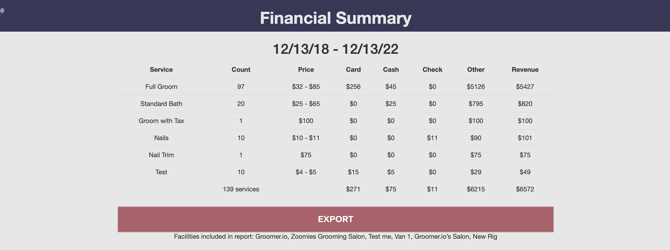
Financial Summary displays the *service, the count of services, price, whether the payment was card, cash, check, or other, and revenue* for your desired date range. It will calculate appointments that are on the Calendar and not just Paid and Checked out appointments. This does not reflect taxes. Please note that this is generalized Working report and does not show details. Canceled appointments that were moved to the check out screen and canceled will also show on this report.
****
### **Employee Summary (Work Report)**
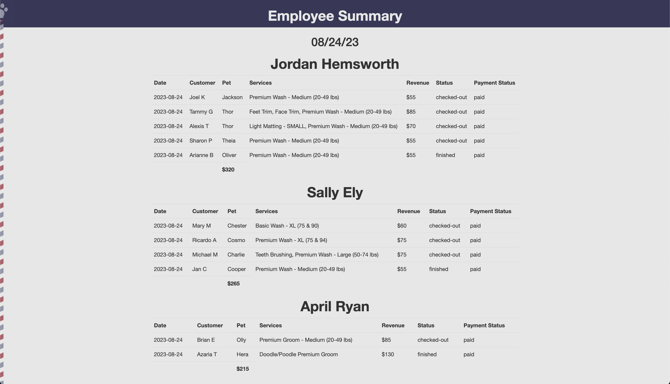
Employee Summary is a breakdown of services, revenue, and totals. It will display the *date, customer, pet, services, revenue, status, and payment status* for a specific employee based on the date range that you provide. This report will display services that are "not-paid" because this is a work report and not a financial report.
### **Appointments Summary (Work Report)**
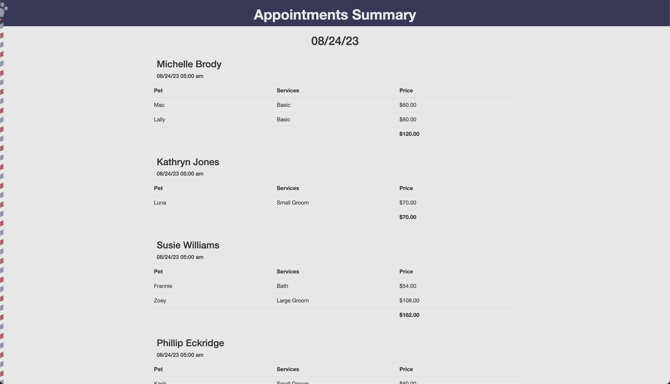
Appointments Summary displays the *customer name, date and time of appointment, pet name, services provided, and price* for your specified date range. It will display services that are "not-paid" because this is a work report and not a financial report.
### **Tips Summary**
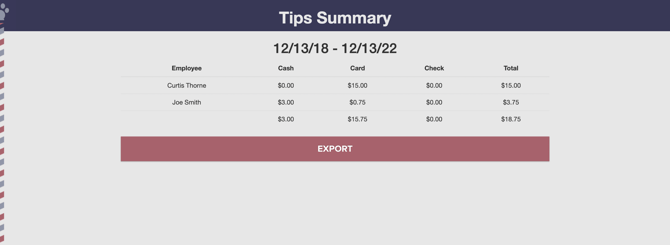
Tips Summary is a breakdown of the tips that have been collected. It will display which *employee the tip was left for, whether the tip was left with cash, card, or check, and the total tip* amount for your desired date range.
****
### **Services by Employee (Work Report)**
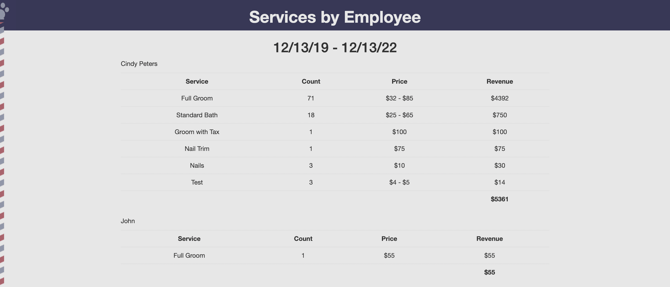
Services by Employee displays the *service, count, price, and total revenue* for each employee in the specified day range. It will display services that are "not-paid" because this is a work report and not a financial report.
****
### **Paid Appointment by Customer (Financial Report)**
Paid Appointments by Customer shows the *date, customer, payment, services, tax, payment kind, tip, discount name, discount total, pet, and groomer* for your specified date range.**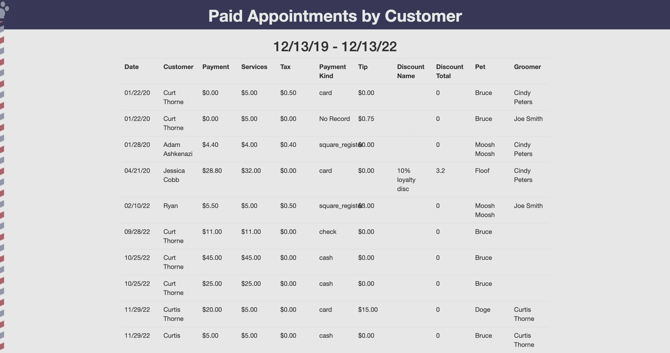**
### **Paid Appointment by Groomer (Financial Report)**
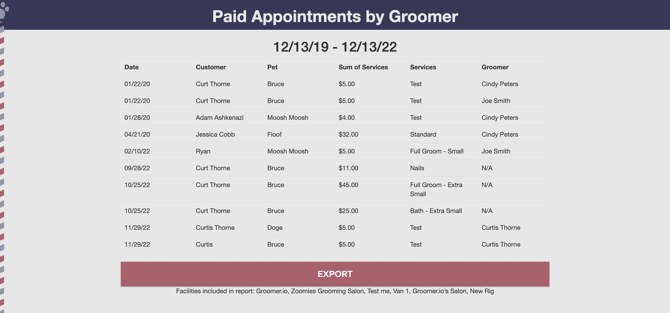
Paid Appointments by Groomer shows the *date, customer, pet, sum of services, and groomer* for your specified date range.
****
### **Tip Details**
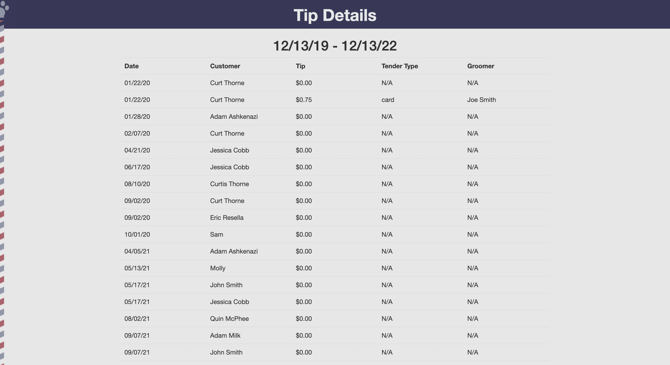
Tip Details is a report that shows the *date, customer, tip, tender type, and groomer* for tips that were received during your specified date range.
****
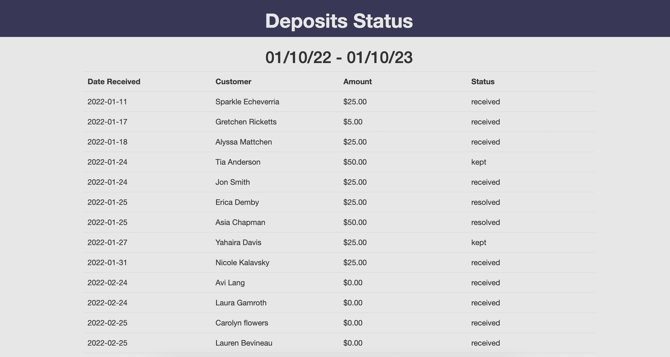
### Deposit Status
Deposit Status displays the *date received, customer, amount, and status* of the deposit for your desired date range.
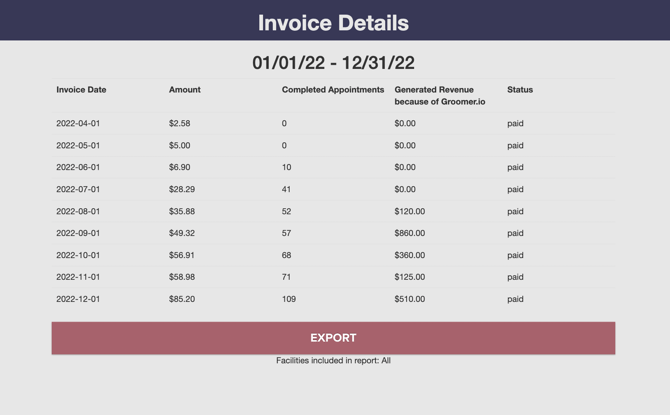
### Invoice Details
Invoice Details displays the *invoice date, amount, number of completed appointments, generated revenue* created in Groomer.io, and the *status* for your specified date range.
**If you would like a custom report or need help running reports please email support@groomer.io.**
- [Getting Started and Onboarding](https://help.groomer.io/getting-started-and-onboarding?hsLang=en)
- ["How To" Help](https://help.groomer.io/how-to-help?hsLang=en#main-content)
- [Discounts](https://help.groomer.io/how-to-help?hsLang=en#discounts)
- [Booking an Appointment](https://help.groomer.io/booking-an-appointment?hsLang=en)
- [Online Scheduling](https://help.groomer.io/online-scheduling?hsLang=en)
- [Features](https://help.groomer.io/features?hsLang=en#main-content)
- [V2](https://help.groomer.io/features?hsLang=en#v2)
- [Payments](https://help.groomer.io/payments?hsLang=en)
[](https://get.groomer.io)
groomer.io Help Center
Copyright © 2026, Groomer.io
```json
{
"@context" : "https://schema.org",
"@type" : "VideoObject",
"contentUrl" : "https://22519146.fs1.hubspotusercontent-na1.net/hubfs/22519146/video_assets/226643005238/inherited/web_optimized.mp4",
"dateModified" : "2026-11-05T21:10:54.320Z",
"duration" : "PT5S",
"height" : 1598,
"name" : "Screen Recording 2026-11-05 at 3.08.01 PM",
"thumbnailUrl" : "https://info.groomer.io/hubfs/Screen%20Recording%202026-11-05%20at%203.08.01%20PM.mov/medium.jpg",
"uploadDate" : "2026-11-05T21:10:54.318Z",
"width" : 2928
}
```
```json
{
"@context" : "https://schema.org",
"@type" : "VideoObject",
"contentUrl" : "https://22519146.fs1.hubspotusercontent-na1.net/hubfs/22519146/video_assets/226642960268/inherited/web_optimized.mp4",
"dateModified" : "2026-11-05T21:11:58.841Z",
"duration" : "PT13S",
"height" : 1598,
"name" : "Screen Recording 2026-11-05 at 3.11.30 PM",
"thumbnailUrl" : "https://info.groomer.io/hubfs/Screen%20Recording%202026-11-05%20at%203.11.30%20PM.mov/medium.jpg",
"uploadDate" : "2026-11-05T21:11:58.839Z",
"width" : 2928
}
```
```json
{
"@context" : "https://schema.org",
"@type" : "VideoObject",
"contentUrl" : "https://22519146.fs1.hubspotusercontent-na1.net/hubfs/22519146/video_assets/226643261450/inherited/web_optimized.mp4",
"dateModified" : "2026-11-05T21:09:44.297Z",
"duration" : "PT18S",
"height" : 1598,
"name" : "Screen Recording 2026-11-05 at 3.08.17 PM",
"thumbnailUrl" : "https://info.groomer.io/hubfs/Screen%20Recording%202026-11-05%20at%203.08.17%20PM.mov/medium.jpg",
"uploadDate" : "2026-11-05T21:09:44.295Z",
"width" : 2928
}
```