![iTunesArtwork@2x.png]](https://help.groomer.io/hs-fs/hubfs/iTunesArtwork@2x.png?height=50&name=iTunesArtwork@2x.png)
How to edit or create custom permissions:
Employees can have different permissions. This can be edited in-app by clicking Employees > Tap on an Employee > Edit > Permissions.
You can also create custom permissions by going to More > Permissions > + > Add a Title > Select what permissions you want Employee's to access > Done.
Once the Permissions Gourp has been created you will need to apply it to the Employee's Login by going to: (for Web/Android/Version 3) Settings, Staff, Select the Staff Member, Edit, Permissions, Set the New Permission Group.
(For iOS/Apple): More, Staff, Select the Staff Member, Edit, Permissions, Set the New Permission Group.
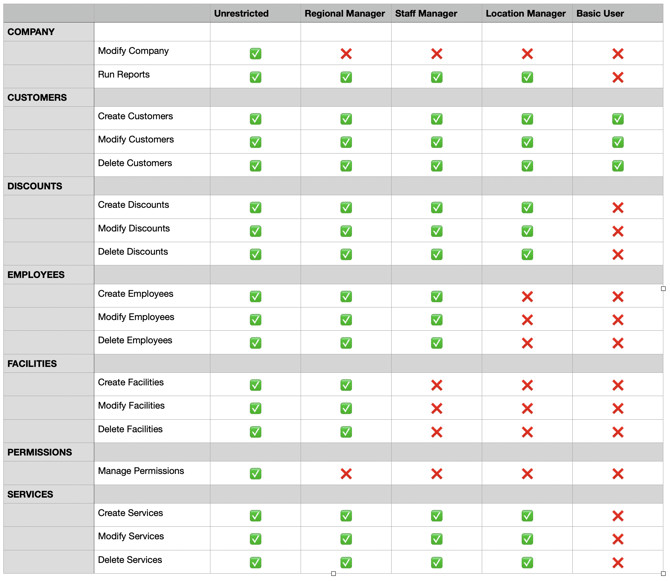
Below is a chart of what each default settings each permission group has access to: